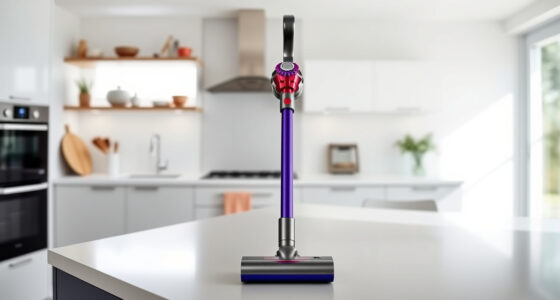
If your Dyson V15 Detect™ cordless vacuum isn’t holding its charge as long as it used to, you’re not alone. Battery issues are common over time, but many problems can be fixed with simple steps. In this guide, you’ll learn how to identify causes for rapid battery drain and how to troubleshoot effectively to restore full runtime and performance.
Follow these practical, safe, and accurate steps to troubleshoot your Dyson vacuum’s battery issues and keep your device running smoothly for deep cleaning sessions.
Key Takeaways
| Battery degradation | Over time, batteries lose capacity and may drain faster. |
| Clogged filters | Dirty filters can cause the motor to work harder, draining the battery. |
| Incorrect settings | High power modes and debris detection can reduce run time. |
| Battery maintenance | Proper care and timely replacements extend battery life. |

Dyson V15 Detect™ Origin Cordless Vacuum
Powerful and intelligent for whole-home deep cleaning. Reveals invisible dust.
As an affiliate, we earn on qualifying purchases.
Check the Battery Health
- Ensure the vacuum is fully charged and not in use during troubleshooting.
- Observe the LCD screen for any alerts related to battery or performance.
- If the run time is significantly less than 60 minutes, the battery may be aging or damaged.

LANMU Crevice Tool Vacuum Attachments Compatible with Dyson V15 V12 V11 V10 V9 V8 V7 Gen5 Outsize Vacuum Cleaner, Narrow Nozzel Replacement Parts for Hard-to-Reach Space
Wide Compatibility: This crevice tool attachment is compatible with V15 V12 V11 V10 V9 V8 V7 Gen5 G5...
As an affiliate, we earn on qualifying purchases.
Clean or Replace the Filters
- Remove the pre-filters and the V10 filters if applicable, following the user manual.
- Rinse filters under water and let them air dry completely (at least 24 hours).
- Replace filters if they are worn out or damaged, using compatible replacements like the 3Pack Pre Filters or V10 filters.
Inspect and Clean the Cleaner Head and Attachments
- Clear any hair, debris, or blockages from the Digital Motorbar cleaner head and crevice tools.
- Ensure no obstructions are causing the motor to strain, which can drain the battery faster.
Adjust Power Settings and Usage Habits
- Use the LCD screen to monitor debris detected and switch to lower power modes when possible.
- Limit use of high-power modes on hard floors unless necessary.
- Pause between cleaning sessions to prevent overheating and battery stress.
Replace the Battery if Needed
- If the battery still drains quickly after cleaning and filter maintenance, consider replacing it.
- Order a compatible replacement battery from Dyson or authorized suppliers.
- Follow the manufacturer’s instructions for safe removal and installation of the new battery.
The Products in This Guide

Dyson V15 Detect™ Origin Cordless Vacuum
- ✔ Weight: 5.9 lbs
- ✔ Charge Time: 3.5 hours
- ✔ Warranty: 2 years

LANMU Crevice Tool Vacuum Attachments Compatible
- ✔ Length: 12 inches
- ✔ Material: Plastic
- ✔ Color: Black
Dyson V15 Detect™ Origin Cordless Vacuum
The Dyson V15 Detect™ Origin offers powerful, intelligent cleaning with a 60-minute runtime, LCD screen, and advanced cleaner heads. Proper maintenance of the battery and filters can prolong its performance.
Pros:
- Powerful suction with 100% more power
- Intelligent debris detection
- Long battery life of 60 minutes
- Versatile cleaning modes
Cons:
- Battery may degrade over time
- Filters require regular cleaning
- High power modes drain battery faster
Best for: Deep, whole-home cleaning with advanced features
Not ideal for: Shorter battery life if not maintained properly
Bottom line: Regular maintenance and timely replacements ensure optimal Dyson V15 performance.
LANMU Crevice Tool Vacuum Attachments Compatible
The LANMU Crevice Tool vacuum attachments are compatible with various Dyson models and excel at reaching tight corners and difficult spots. Their slim design makes cleaning more thorough and effortless.
Pros:
- Narrow nozzle fits into small gaps
- Compatible with multiple Dyson models
- Made of durable materials
- Easy to attach and use
Cons:
- Not compatible with V6 or canister models
- May need additional extension for very deep spots
Best for: Cleaning corners, car interiors, and narrow spaces
Not ideal for: For general surface cleaning
Bottom line: A must-have attachment for thorough, precise cleaning in tight spaces.
Frequently Asked Questions
Why does my Dyson V15 battery drain quickly even after a full charge?
Battery degradation over time or clogged filters can cause faster drain. Regular maintenance and replacing aging batteries can help restore runtime.
How often should I replace the filters on my Dyson V15?
Filters should be cleaned every 1-3 months and replaced every 6-12 months, depending on usage. Using compatible filters like the 3Pack Pre Filters or V10 Filters can ensure optimal performance.
Can I replace the Dyson V15 battery myself?
Yes, with proper tools and following the manufacturer’s instructions, you can replace the battery yourself. Ensure you purchase a compatible replacement battery for safety and performance.
What should I do if my Dyson vacuum still drains quickly after cleaning filters?
If cleaning filters and maintaining the cleaner head doesn’t improve battery life, consider replacing the battery or contacting Dyson support for further assistance.
Keep Your Dyson V15 Running Like New
Proper maintenance, timely filter replacements, and addressing battery health are essential to ensure your Dyson V15 Detect™ cordless vacuum performs at its best. Regular checks and following these troubleshooting steps can help extend the life of your device, making deep cleaning easier and more efficient.
Affiliate disclosure: As an Amazon Associate we earn from qualifying purchases. Prices and availability are accurate as of the time of publishing.