TL;DR
Building your own AI workstation was cheaper historically, but rising component prices now make prebuilt systems competitive or even cheaper. Decide based on control, speed, and support, not just price.
Imagine walking into a store and grabbing a fully tuned, ready-to-run AI workstation. No assembly, no troubleshooting, just immediate power and performance. Sounds simple, right? But behind that ease lies a complex web of decisions—cost, control, and speed—that can make or break your AI projects.
This article cuts through the myth that building is always cheaper and explores why, in 2026, prebuilt systems are often just as affordable—sometimes more so—and far quicker to deploy. Whether you’re a researcher, developer, or hobbyist, understanding these trade-offs will help you pick the best route for your AI ambitions.
Build vs buy
an AI workstation.
The real question behind this whole series: do you pull the five heat-and-noise levers yourself, or buy a prebuilt where the vendor pulled them for you? And in 2026, the old “building is cheaper” rule has broken. Match your situation in Part 3.
Key Takeaways
- Component shortages in 2026 make prebuilt AI workstations often as affordable as DIY builds, especially when factoring in time and support.
- Prebuilts deliver validated thermals, tested stability, and warranties—saving you troubleshooting hours and reducing downtime.
- Building your own system offers unmatched control, customization, and learning opportunities but requires time and thermal management skills.
- Always compare the total cost—including time, potential troubleshooting, and support—when deciding between build and buy.
- Your choice depends on workload needs: for quick deployment and support, prebuilts shine; for customization and control, DIY remains king.

CLX Horus Gaming PC - Intel Core Ultra 9 285K 3.7GHz, GeForce RTX 5080, 2TB SSD, 32GB DDR5 RGB Memory, 360mm AIO, WiFi, Windows 11 Home, White, AI-Accelerated
- High-Performance CPU: Intel Core Ultra 9 285K, 24 cores, 5.70GHz
- Advanced Graphics Card: GeForce RTX 5080, 16GB GDDR7
- Fast Memory and Storage: 32GB DDR5 RAM, 2TB SSD
As an affiliate, we earn on qualifying purchases.
As an affiliate, we earn on qualifying purchases.
Why the 'Build Is Always Cheaper' Myth Is Dead in 2026
Once upon a time, building your own AI workstation was the cheapest route. You could cherry-pick parts, avoid markup, and customize everything. But the AI boom has flipped that script. Component shortages and demand spikes have pushed prices sky-high, making DIY more expensive than it used to be.
For example, a high-end GPU that cost around $1,200 in 2024 now often runs over $1,600 due to shortages. Meanwhile, prebuilt vendors, who buy in bulk and optimize manufacturing, can offer similar setups at comparable or even lower prices.
According to recent market data, the typical DIY build that used to come under $1,000 now pushes past $1,250 before even considering OS licenses. So, in 2026, the traditional rule that DIY always wins on cost no longer holds true—at least not without a serious, time-consuming hunt for deals.
Beyond just the sticker price, it’s crucial to consider the implications—delays, compatibility issues, and the learning curve. The time spent sourcing parts, troubleshooting hardware conflicts, and fine-tuning cooling or thermals can easily outweigh the initial savings. This shift emphasizes that cost isn’t just about the upfront price but also about the total effort and potential downtime involved in DIY projects.

ASUS NUC 15 Pro Mini Desktop Computer, Intel Series 2 Core Ultra 7 255H, 32GB DDR5 RAM, 1TB PCIe SSD, Intel Arc 140T GPU, AI Mini PC Win 11 Pro, 8K/Quad 4K HDR, Thunderbolt 4, WiFi 7, BT 5.4
- Powerful AI & Multitasking: Intel Core Ultra 7 255H, Intel Arc 140T GPU
- High-Speed Memory & Storage: Supports up to 128GB DDR5 RAM, 48TB SSD
- 8K & Quad 4K Display Support: HDMI 2.1, Thunderbolt 4 for multiple displays
As an affiliate, we earn on qualifying purchases.
As an affiliate, we earn on qualifying purchases.
The Five Levers of a High-Power AI Workstation — Who Pulls Them?
Running a powerful AI system smoothly isn’t just about parts—it's about managing heat, noise, and stability. These are the five levers: undervolting GPUs, matching cooling systems, optimizing airflow, tuning fans, and positioning the system. Who handles these influences? You or the vendor.
If you buy a prebuilt, the vendor pulls these levers. They validate thermals, run long stress tests, and often install water-cooling for quieter operation. BIZON, Puget Systems, and Lambda do this at the factory, delivering a tested, ready-to-go machine.
Building yourself? You’re the one pulling those levers. It takes patience, know-how, and ongoing tweaks. Choosing a quiet GPU, undervolting it, selecting a cooler, and setting up airflow — all these are your responsibility, but they offer unparalleled control.
This control over thermal management isn’t just about noise reduction; it directly impacts performance and longevity. Proper thermals prevent thermal throttling, which can cause significant drops in computational speed during prolonged workloads. Conversely, poor thermal design can lead to overheating, hardware failures, and costly replacements. The tradeoff here is between convenience and the potential for optimized performance—if you have the skills and time to manage it, building can yield a more finely-tuned system tailored to your specific workload and environment.
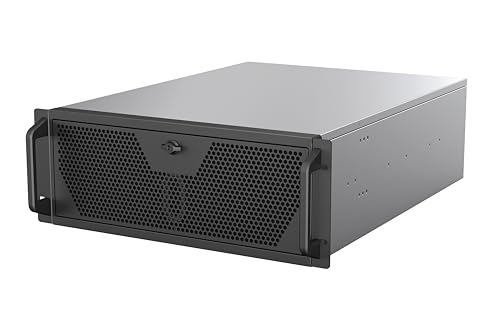
Rosewill 4U Rackmount Server Chassis | Supports up to 2 x 3.5 HDD & 4 x 2.5 SSD | E-ATX & SSI-EEB Compatible | 360mm AIO Support | 3 x 120mm PWM Fans | USB 3.2 Type-C | RSV-L4620
- Motherboard Compatibility: Supports E-ATX motherboards for high performance
- AIO Cooling Support: Supports 360mm radiator for liquid cooling
- Pre-installed PWM Fans: Includes three 120mm PWM fans for airflow
As an affiliate, we earn on qualifying purchases.
As an affiliate, we earn on qualifying purchases.
When a Prebuilt System Is Your Best Bet
If speed, reliability, and support matter most, a prebuilt system often wins. It’s ready to deploy as soon as it arrives—no sourcing, assembly, or troubleshooting needed. For busy professionals, that can save days or even weeks.
Prebuilts come with validated thermals, tested stability, and warranty coverage. If your workload is multi-GPU or high-end, vendors like Lambda ensure the system handles sustained load without throttling, reducing downtime and unexpected failures.
Plus, with OS and AI software pre-installed, you’re up and running in minutes, not hours. This immediate readiness isn’t just about convenience; it’s about ensuring your AI projects stay on schedule, especially when delays could cost you deadlines or opportunities. The reliability of a pretested, factory-validated system means fewer surprises, less troubleshooting, and more focus on your actual work—crucial in environments where every minute counts and downtime can be expensive.

NVD RTX PRO 6000 Blackwell Professional Workstation Edition Graphics Card for AI, Design, Simulation, Engineering - 96GB DDR7 ECC Memory - 4th Gen RT/5th Gen Tensor Core GPU - OEM Packaging
- Enhanced Processing Power: NVIDIA Blackwell Streaming Multiprocessor with neural shaders
- Advanced Cooling Design: Double-flow-through cooling for peak performance
- Next-Gen Tensor Cores: 5th Gen with 3X performance boost
As an affiliate, we earn on qualifying purchases.
As an affiliate, we earn on qualifying purchases.
When Building Yourself Makes Sense — Even in 2026
Building your own AI workstation is still worthwhile if you crave maximum control or have unique needs. Want a specific GPU model not available prebuilt? Or need a custom cooling solution to keep noise down in your quiet home office? DIY shines here.
It’s also perfect if you enjoy tinkering or want to learn. The process of sourcing parts, assembling, and tuning is a skill-builder and gives you deep insight into your system’s guts. Plus, you can upgrade specific components later, extending your machine’s lifespan.
If budget is tight and you have spare hours, DIY can also save money—though that’s less true in 2026. For example, a hobbyist who loves optimizing airflow and undervolting might spend a weekend fine-tuning a system that outperforms a prebuilt in noise and thermals. Beyond cost, the control over every component allows you to tailor the system precisely to your workload, whether that’s specialized AI training, inference, or experimental setups. This level of customization can lead to better efficiency, lower operational costs, and a more satisfying user experience for those willing to invest the time and effort.
The Real Cost Comparison: Building or Buying in 2026
| Factor | Build Your Own | Buy Prebuilt |
|---|---|---|
| Price | Often similar or higher due to component shortages | Includes assembly, validation, support; sometimes cheaper |
| Time to Deploy | Hours to days sourcing parts, assembling, troubleshooting | Minutes to hours; plug-and-play |
| Support & Warranty | Fragmented; depends on individual parts | Single point of contact; longer warranties |
| Customization | Unlimited; tailored exactly to your needs | Limited by vendor options, but often flexible |
| Thermal & Noise Control | Your responsibility, requires expertise | Validated and optimized at the factory |
Recent market data shows that in 2026, a prebuilt with high-end specs can match or beat DIY costs, especially when factoring in time and support. This isn’t just about sticker prices; it’s about the total value—considering the costs of troubleshooting, potential downtime, and the peace of mind support provides. For many, the hidden costs of DIY—delays, compatibility issues, and ongoing tweaks—make prebuilts a smarter, more efficient choice.
Key Things to Remember Before You Decide
- Cost isn’t just the sticker price: Factor in time, support, troubleshooting, and potential delays. The true cost of DIY often includes hidden expenses that accumulate quickly.
- Speed matters: Prebuilts are ready to run out of the box, minimizing setup time. DIY can take days or weeks, which might not align with project deadlines.
- Support and warranty: Prebuilts offer single-point support and longer warranties, reducing your burden in case of hardware issues. DIY setups require managing multiple warranties and troubleshooting across different vendors.
- Upgradeability: Building your own system generally allows for easier future upgrades tailored to evolving needs. Prebuilts often limit upgrade options, potentially requiring replacements sooner.
- Workload fit: Consider whether your workload involves training large models, inference, or experimentation. Both approaches can be optimized, but the method you choose should match your specific performance and flexibility needs.
Frequently Asked Questions
Is a prebuilt AI workstation more expensive than building one?
Not necessarily. Recent data shows that component shortages and high demand have pushed DIY component prices up, sometimes making prebuilt systems equally or more affordable when you consider time and support. Always compare specific configurations before deciding.
When is building better than buying a prebuilt?
Building makes sense if you need specific hardware, want maximum control, or enjoy the process. It’s ideal for niche setups, future upgrades, or if you want to learn how every component works. If time and support matter more, prebuilts often lead the way.
What do I lose by buying prebuilt?
You might have slightly less control over exact component choices and cooling setups. Upgrading can also be more limited, depending on the vendor. But for most users, the convenience and validation outweigh these limitations.
How much does warranty/support matter for AI workstations?
Support and warranty can save you hours of troubleshooting and unexpected downtime. Prebuilts usually come with longer, comprehensive coverage, which is especially valuable if your AI workloads are critical or time-sensitive.
Can I upgrade a prebuilt AI workstation later?
Yes, but it depends on the design. Some prebuilts allow upgrades of RAM, storage, or even GPUs, but others are more restricted. Always check the upgrade path before purchasing if future flexibility matters.
Conclusion
In 2026, the classic build vs buy debate hinges less on price and more on what you need from your AI system. Do you want immediate, reliable performance with support? Or do you prefer tuning every detail yourself? Either way, understanding the actual costs and benefits helps you make a smarter choice.
Remember: a well-chosen prebuilt can be your shortcut to productivity, while building your own offers ultimate control. The right answer depends on your project, your skills, and your patience. Choose what aligns best with your goals—and get to work.